
How Philadelphia businesses can use Pinterest
Pinterest, the newest part of the still recent Social Network phenomena, is best described as a large virtual pinboard. You can create different boards, share them with your network of friends, and follow those that you want to. What’s great about this network is that you are speaking through these pictures; it is a way for you to categorize your favorite things– animals, books, artwork, real estate etc., and share them.
HOW TO GET STARTED WITH PINTEREST:
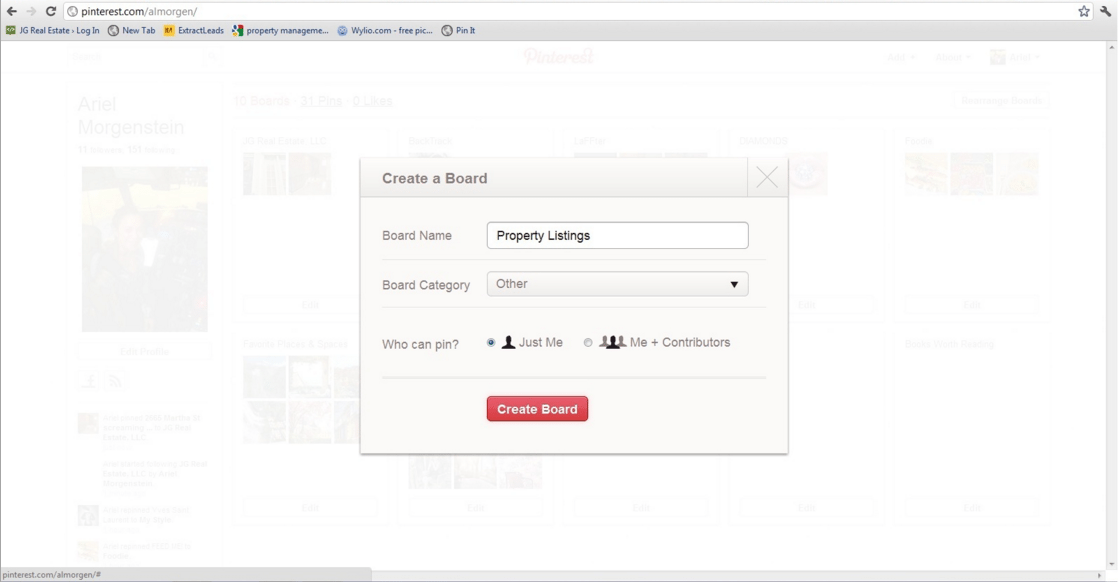
- If you are a newbie to Pinterest, the first step is to create your boards. Come up with some ideas of the content you want to share. Pinterest gives you available options including Design, Film, Music & Books, People, Technology, etc., but there is also an option to Create Your Own Board – this is where you, as a business, can get interesting. Create boards such as “property listings,” “neighborhood hotspots,” or whatever else you can come up with. Remember there is no limit to the type of boards you can create.
- Next, you should get the “pin” for your Bookmarks bar. This is the easiest way for you to add and upload some of your own content. You are able to upload pictures from your own computer or paste links, but this is much less time consuming. Simply drag the “Pin It” button to your bookmarks bar and, while you’re browsing, hit the button. This will automatically find you any image that is on that page.

- Once you choose an image to pin, you have to describe it. This can be as formal or as fun of a description that you want. For example, if you’re leasing an apartment, you may want to add the location, price, and information about the apartment.

- Once you have the ins and outs of Pinterest figured out, it is time to decide whether you want to share this on your other social networks. Under “settings,” you can choose whether or not you automatically want to share with your Facebook and Twitter networks. Businesses that already have a following on these networks could benefit from this linkage. Also, follow other users that have boards you enjoy or boards that pertain to your business.
- Pinterest is best known for sharing images. However, in August, Pinterest added a way for you to share videos through the site. The best way to do this is by clicking the “Add” buttons at the top of the page and selecting “Add a pin.” Paste the link to the video you want to pin and follow the same process you would if you were posting an image.


- Have other members of your work team that you want to be able to contribute to your board. You can allow others to have access to your boards. When you’re adding a board, simply select the option “Me + Contributors” and add the names of whomever you want to post. If you have already created a board and decide you want to add other contributors, go to “edit board” and follow the same steps.

There is so much you can do with Pinterest. Don’t limit yourself. It is a way for you to virtually have a collection, create your own cookbook, decorate your dream house, etc. When using for a business, remember who your followers are. Highlight your assets, promote other businesses that you work with or that you’re friendly with, use it to show who you are as a company.